

• Advert Rates
  • Careers
  • About Us
  • Contact Us
  • Digital Store
Wednesday, August 5, 2026
The Trumpet Newspaper Nigeria
No Result
View All Result
  • Home
  • News
    • Breaking News
    • Headlines
    • Metro
    • Health
  • Politics
  • Business
    • Ecommerce
    • Economy
    • Start-up
  • Entertainment
  • Sports
  • Opinion
    • Religion
    • Columnists
    • Contributors
    • Editorial
  • Global
    • Climate
    • Culture
    • Tourism
    • Technology
    • Weather
    • Social Media
  • e-Edition
  • Home
  • News
    • Breaking News
    • Headlines
    • Metro
    • Health
  • Politics
  • Business
    • Ecommerce
    • Economy
    • Start-up
  • Entertainment
  • Sports
  • Opinion
    • Religion
    • Columnists
    • Contributors
    • Editorial
  • Global
    • Climate
    • Culture
    • Tourism
    • Technology
    • Weather
    • Social Media
  • e-Edition
No Result
View All Result
The Trumpet Newspaper Nigeria
No Result
View All Result
ADVERTISEMENT
Home News

How To Check Your 2026 WAEC Results Online

Blessing Oziwo by Blessing Oziwo
August 5, 2026
in News
Reading Time: 2 mins read
0
How To Check Your 2026 WAEC Results Online
0
SHARES
8
VIEWS
Share on FacebookShare on TwitterShare on LinkedinShare on WhatsAppShare on Pinterest

The West African Examinations Council (WAEC) has released the 2026 West African Senior School Certificate Examination (WASSCE) results.

Candidates can now access their results online by generating or recovering their WAEC Result Checker PIN and Serial Number.

ADVERTISEMENT

In a statement posted on its official X account, WAEC advised candidates to first obtain their Result Checker PIN and Serial Number before attempting to check their results.

Below is the simple steps to check your result:

Step 1: Get Your WAEC Serial Number and PIN

Before checking your result, ensure you have the following:

Your WAEC Examination Number
Your WAEC Serial Number
Your WAEC PIN

Read Also:

  • FG Suspends Plan To Review WAEC Costs After Public Outcry, Orders Stakeholder Consultations
  • WAEC releases 2026 WASSCE timetable
  • WAEC launches full implementation of digital certificate services

If you do not have your Serial Number or PIN, you can recover them by following these steps:

Visit the official WAEC website.
Click on the “Serial Number and PIN” option at the top of the homepage.
Select 2026 as the examination year.
Choose the appropriate examination diet.
Enter your WAEC Examination Number.
Enter the National Identification Number (NIN) you used during registration.
Provide your email address and phone number to receive a One-Time Password (OTP).
Enter the OTP to recover your Serial Number and PIN.

Candidates can also download their WAEC Identity Card through the same portal.

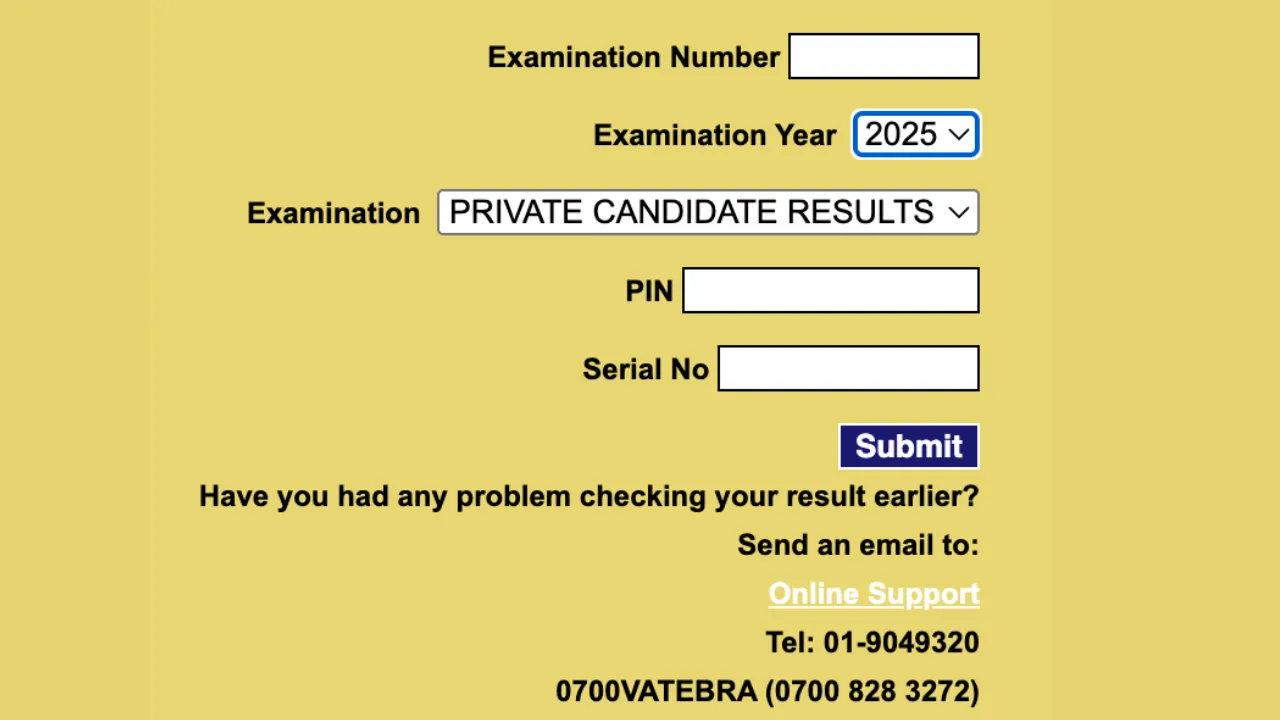
Step 2: Visit the WAEC Result Portal

Go to the official WAEC result-checking portal using any internet-enabled phone, tablet or computer.

Step 3: Enter Your Examination Number

Input your 10-digit examination number, which consists of:

Your 7-digit centre number.
Your 3-digit candidate number.

Example: 4123456789.

Step 4: Select the Examination Year

Choose 2026 from the list of available examination years.

Step 5: Select the Examination Type

Select the appropriate examination type (WASSCE) from the options provided.

Step 6: Enter Your Serial Number and PIN

Type in the WAEC Serial Number and PIN you generated or recovered earlier.

Step 7: Submit Your Details

Click the Submit button.

Your result will be displayed on the screen. You can print it or save a digital copy for future reference.

How to Check Your Result Using the WAEC Mobile App

Candidates can also access their results through the WAEC Result Checker mobile application.

Follow these steps:

Download the WAEC Result Checker App from the Google Play Store.
Open the application.
Enter your examination number.
Select 2026 as the examination year.
Enter your WAEC Serial Number and PIN.
Tap Submit to view and download your result.
How to Check Your WAEC Result via SMS

Candidates without internet access can also check their results through SMS.

Type the message in the following format:

WAECExaminationNumberPIN*ExaminationYear

Example:

WAEC4123456789123456789012*2026

Send the message to the WAEC-approved SMS number for your mobile network. Your result will be delivered via SMS once your request is successfully processed.


Previous Post

APC Expresses Confidence In Winning 171 Coucillorship, 13 Chairmanship Seats In Ebonyi

Next Post

NVBF Unveils Ryan Masajedi As Head Coach/Technical Adviser To Lead National Volleyball Revival

Blessing Oziwo

Blessing Oziwo

Next Post
NVBF Unveils Ryan Masajedi As Head Coach/Technical Adviser To Lead National Volleyball Revival

NVBF Unveils Ryan Masajedi As Head Coach/Technical Adviser To Lead National Volleyball Revival

About The Trumpet

The Trumpet is a Nigerian based national news media, owned, trademarked and operated by Elomaz Communications Limited with headquarters in FCT-Abuja and regional offices in Lagos and Delta States

Follow Us

Resources

  • Home
  • News
    • Breaking News
    • Headlines
    • Metro
    • Health
  • Politics
  • Business
    • Ecommerce
    • Economy
    • Start-up
  • Entertainment
  • Sports
  • Opinion
    • Religion
    • Columnists
    • Contributors
    • Editorial
  • Global
    • Climate
    • Culture
    • Tourism
    • Technology
    • Weather
    • Social Media
  • e-Edition

Recent News

Nigerian Coast Guard Bill Will End Overlapping Maritime Agencies, Says Provisional Committee

Nigerian Coast Guard Bill Will End Overlapping Maritime Agencies, Says Provisional Committee

August 5, 2026
Governor Adeleke Drags EFCC To Court Over Freeze On Osun State Allocation Account

Governor Adeleke Drags EFCC To Court Over Freeze On Osun State Allocation Account

August 5, 2026
  • Cookie Policy
  • Disclaimer
  • Contact us
  • About Us
  • Cookie Policy
  • Disclaimer
  • Contact us
  • About Us

© 2025 The Trumpet News Papers - Developed by VIS Nigeria.

No Result
View All Result
  • Home
  • News
    • Breaking News
    • Headlines
    • Metro
    • Health
  • Politics
  • Business
    • Ecommerce
    • Economy
    • Start-up
  • Entertainment
  • Sports
  • Opinion
    • Religion
    • Columnists
    • Contributors
    • Editorial
  • Global
    • Climate
    • Culture
    • Tourism
    • Technology
    • Weather
    • Social Media
  • e-Edition

© 2025 The Trumpet News Papers - Developed by VIS Nigeria.

We use cookies on our website to give you the most relevant experience by remembering your preferences and repeat visits. By clicking “Accept All”, you consent to the use of ALL the cookies. However, you may visit "Cookie Settings" to provide a controlled consent.
Cookie SettingsAccept All
Manage consent

Privacy Overview

This website uses cookies to improve your experience while you navigate through the website. Out of these, the cookies that are categorized as necessary are stored on your browser as they are essential for the working of basic functionalities of the website. We also use third-party cookies that help us analyze and understand how you use this website. These cookies will be stored in your browser only with your consent. You also have the option to opt-out of these cookies. But opting out of some of these cookies may affect your browsing experience.
Necessary
Always Enabled
Necessary cookies are absolutely essential for the website to function properly. These cookies ensure basic functionalities and security features of the website, anonymously.
CookieDurationDescription
cookielawinfo-checkbox-analytics11 monthsThis cookie is set by GDPR Cookie Consent plugin. The cookie is used to store the user consent for the cookies in the category "Analytics".
cookielawinfo-checkbox-functional11 monthsThe cookie is set by GDPR cookie consent to record the user consent for the cookies in the category "Functional".
cookielawinfo-checkbox-necessary11 monthsThis cookie is set by GDPR Cookie Consent plugin. The cookies is used to store the user consent for the cookies in the category "Necessary".
cookielawinfo-checkbox-others11 monthsThis cookie is set by GDPR Cookie Consent plugin. The cookie is used to store the user consent for the cookies in the category "Other.
cookielawinfo-checkbox-performance11 monthsThis cookie is set by GDPR Cookie Consent plugin. The cookie is used to store the user consent for the cookies in the category "Performance".
viewed_cookie_policy11 monthsThe cookie is set by the GDPR Cookie Consent plugin and is used to store whether or not user has consented to the use of cookies. It does not store any personal data.
Functional
Functional cookies help to perform certain functionalities like sharing the content of the website on social media platforms, collect feedbacks, and other third-party features.
Performance
Performance cookies are used to understand and analyze the key performance indexes of the website which helps in delivering a better user experience for the visitors.
Analytics
Analytical cookies are used to understand how visitors interact with the website. These cookies help provide information on metrics the number of visitors, bounce rate, traffic source, etc.
Advertisement
Advertisement cookies are used to provide visitors with relevant ads and marketing campaigns. These cookies track visitors across websites and collect information to provide customized ads.
Others
Other uncategorized cookies are those that are being analyzed and have not been classified into a category as yet.
SAVE & ACCEPT